

Currencies
1. Finance
1.1 Currencies
Ozosoft ERP system with multi-currency support automatically convert transactions from foreign currencies to the organization’s base currency. This allows businesses to maintain accurate financial records and avoid manual currency conversion errors. User can add/delete and edit currency from this screen as shown in figure 1.
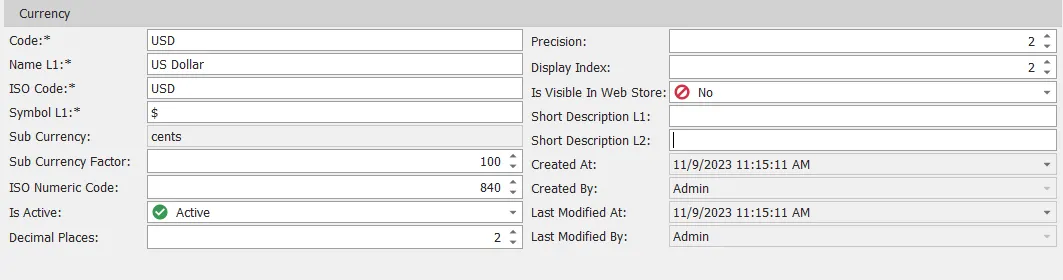
figure 1
| # | Field | Description |
|---|---|---|
| 1 | Code | Currency code, this is mandatory and unique field |
| 2 | Name L1 | Currency name language 1, shouldn’t be empty |
| 3 | Iso Code | Currency ISO code, mandatory and unique field |
| 4 | Symbol L1 | Currency symbol language 1, shouldn’t be empty |
| 5 | Sub Currency | Currency sub currency |
| 6 | Sub Currency Factor | Sub currency factor |
| 7 | ISO Numeric Code | Currency ISO Numeric Code, unique field |
| 8 | Is Active | Select if this currency active or inactive |
| 9 | Decimal Places | Currency decimal places |
| 10 | Precision | Currency precision |
| 11 | Display Index | Currency display index |
| 12 | Is Visible In Web Store | Select if this currency visible in company web store or not |
| 13 | Short Description L1 | Brief currency description language 1 |
| 14 | Short Description L2 | Brief currency description language 2 |
| 15 | Created At | Generated automatically by system contain date when record created |
| 16 | Created By | Generated automatically by system contain user who create this record |
| 17 | Last Modified At | Generated automatically by system contain date when record last modefied |
| 18 | Last Modified By | Generated automatically by system contain user who last modify this record |