

Branch Group
1. Organization Structure
1.3 Branch Group
User define branch group to make grouping for similar branches with similar data. Adding/deleting and editing branch group from this screen as shown in figure 1.
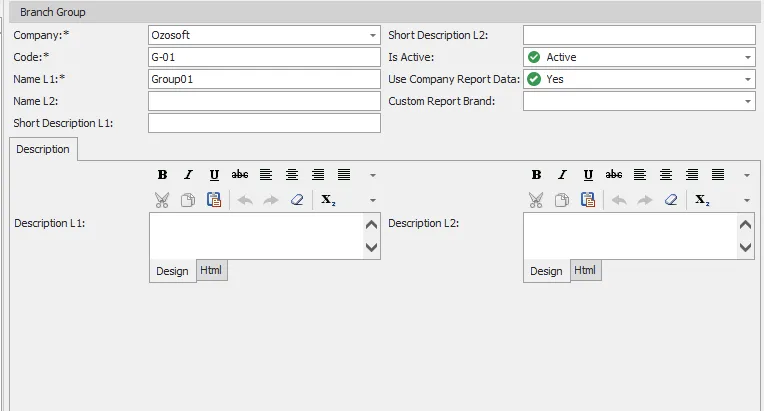
figure 1
| # | Field | Description |
|---|---|---|
| 1 | Code | Group code (e.g., G-01), should be unique and not empty |
| 2 | Name L1 | Branch group name language 1 (e.g., Group 01) shouldn’t be empty and should be unique |
| 3 | Name L2 | Branch group name language 2. |
| 4 | Company | Company of this branch group. shouldn’t be empty |
| 5 | Short Description L1 | brief group description language 1. |
| 6 | Short Description L2 | brief group description language 2. |
| 7 | Report Brand | display report brand of this branch group. |
| 8 | Use Company Report Data | Select “Yes/No” if you need use same company report data or not. |
| 9 | Custom Report Brand | if this group doesn’t use company report data, choose custom report brand. |
| 10 | Is Active | Select if this branch group is active or inactive. |
| 11 | Description L1 | full description for branch group in language 1. |
| 12 | Description L2 | full description for branch group in language 2. |