

Location
2. Organization Structure Setup
2.2 Location
if company has many location ozosoft allows you to add locations adding/deleting and editing Location from this screen as shown in figure 1.
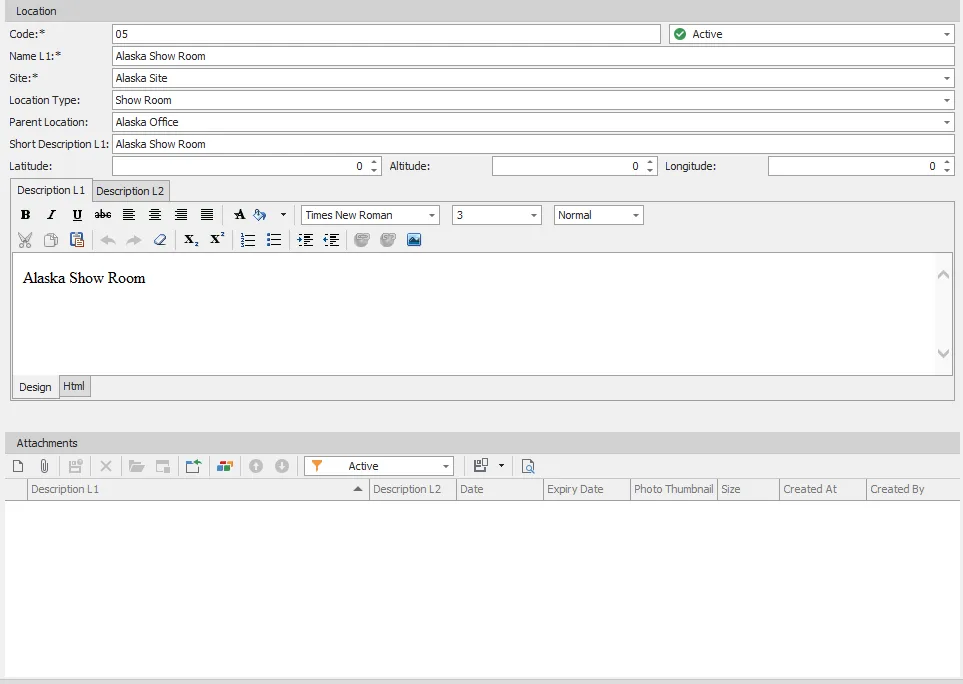
figure 1
| # | Field | Description |
|---|---|---|
| 1 | Code | Location code (e.g., 05) shouldn’t be empty and should be unique |
| 2 | Name L1 | Location name language 1 (e.g., Alaska show room) this record is mandatory and unique |
| 3 | Location Type | Location Type |
| 4 | Site | Location site is mandatory field. |
| 5 | Parent Location | Parent location of this location. |
| 6 | Short Description L1 | brief location description language 1. |
| 7 | Short Description L2 | brief location description language 2. |
| 8 | Latitude | Location Latitude value. |
| 9 | Longitude | Location Longitude value. |
| 10 | Altitude | Location Altitude value. |
| 11 | Is Active | Select if this location is active or inactive. |
| 12 | Description L1 | full description L1 for location. |
| 13 | Description L2 | full description L2 for location. |
| 14 | Attachments | Add attachments for this location. |